Code · Open-source tool / native Windows app
ResMon

A deliberately lightweight Windows 11 resource monitor: a single self-contained C++ executable that shows CPU, GPU, RAM, temperatures, network and disk I/O in a compact desktop widget.
- Role
- Author, developer & owner
- Platform
- Windows 11 x64
- Workflow
- AI-assisted (Claude)
- License
- MIT
Overview
Most system monitors are heavier than the load they are meant to watch. ResMon goes the other way: no installer, no runtime, nothing to set up. Unzip it and run it.
What it shows
- CPU, GPU and RAM load, plus network and disk I/O. Every row can be switched on or off.
- CPU temperature on Intel and AMD Zen processors, read through the signed PawnIO driver, with a Windows thermal-zone fallback.
- NVIDIA GPU temperature through NVML, loaded on demand from the installed display driver, without CUDA or nvidia-smi.
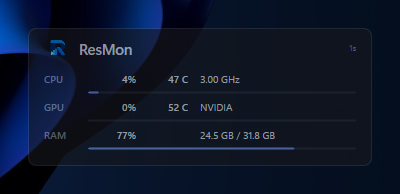
Right-click options cover always-on-top, a 1/2/5-second update rate, dark and light themes, opacity and starting with Windows.
Why it stays lightweight
- No Electron, .NET, Qt or browser engine: the UI draws directly with Direct2D and DirectWrite
- Expensive probes run less often: CPU clocks roughly every 10 seconds, temperatures slower than load
- Counters for hidden rows are not collected at all, and NVML is only loaded when temperatures are shown
- Value easing runs on a short-lived timer that stops once the numbers settle
The sensor components needed for enhanced CPU temperatures are embedded at build time, and the driver is only installed on request, through the normal Windows UAC prompt.